Article
October 15, 2026
What to Review Before Your Next IT Renewal: 8 Steps


Article
October 15, 2026
Before your next IT renewal, review six things: the notice window and auto-renewal terms, what you're actually using compared with what you're paying for, how the price and packaging are changing, whether the tool still fits your roadmap, the contract terms beyond price, and who needs to be part of the decision. Start that review at least 90 days before the renewal date, because the leverage you have shrinks every week you wait.
We don't say that from theory. Over the past 12 months, Opkalla's Technology Advisors guided clients through more than 700 IT renewals across nearly 300 organizations. Opkalla is a vendor-neutral technology advisory firm, so those conversations covered everything from security tools and cloud platforms to connectivity, collaboration, and Microsoft licensing. The checklist below is what we see separate a smooth renewal from an expensive surprise.
Most IT teams spend weeks evaluating a new tool and minutes renewing an old one. That's understandable, since a renewal feels like maintenance. However, every renewal is a decision to keep paying for something for another one, three, or five years, often at a higher price than last time. If that decision happens by default, you've made it without looking.
The other problem is timing. Some vendors don't send renewal quotes until 30 to 60 days before the term ends. By then, the notice window may already be closed, there's no time to evaluate alternatives, and your negotiating position loses its leverage.
"Renewal dates can creep up on an IT team that doesn't have a good way to track it or a partner to help manage,” says Alan King, Senior Technology Advisor at Opkalla. “In our newer client relationships, it's common to find organizations tracking renewals in Excel or relying on the provider to let them know when a renewal is coming due."
The first thing to check on a renewal isn't the price. It's the date you need to act by.
Many IT contracts auto-renew unless you give written notice, and that notice window is often 30, 60, or 90 days before the term ends. Miss it and you may be locked into another full term, sometimes at the vendor's new list price.
Alan emphasizes that the auto-renewal clause is an important item to note before signing. "Auto-renewal notice windows typically range from 30 to 90 days. Organizations that aren't tracking them can be forced into another 12-month term because they missed the deadline to give notice. We've seen it happen, and it can have a significant impact."
Some notice windows close even earlier. Samantha Brooks, Senior Technology Advisor at Opkalla, worked with a college that had brought on a managed detection and response (MDR) provider three years earlier, in reaction to a cyber incident. Since then, the college had hired a more advanced security team, outgrown that provider, and wanted one with more hands-on, human-driven support. The contract had a 120-day non-renewal window.
"That's a really early window. You have to make a decision long before the renewal date, and a lot of people get stuck in renewals because of that clause," Samantha says. "Because we got ahead of it, we were able to find out what they liked and didn't like about their current provider, define the requirements for a new one, and send the notice of non-renewal in time. We also let the incumbent know they were evaluating other solutions. That gave the college time to run proofs of value with new providers and decide who to switch to."
For every contract coming up in the next six to twelve months, find:
That third point trips up more teams than you'd expect. Notices go to whoever signed the original contract, or to an inbox nobody watches.
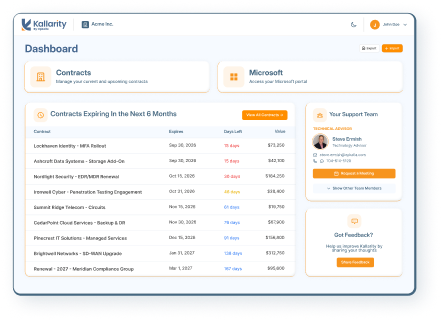
If you only do one thing after reading this, build a single list of every IT contract with its term end date and notice deadline. The point is to have one place to look.
[RELATED: Kallarity by Opkalla – One place for managing your IT contracts and renewals.]
The second review is utilization. Pull the actual usage numbers and put them next to what you're licensed for.
For example, you might be paying for 500 seats of a collaboration tool and have 410 active users. You might have a premium security tier where your team only uses the features in the standard one. You might have two tools doing overlapping jobs because one came with a bundle and the other was purchased by a different department.
Here are four questions to work through when reviewing your utilization:
If you're signing a multi-year renewal, right-size first. Every unused license you cut is savings you keep for each year of the new term. Just don't cut too close if you're growing, because buying seats back mid-term is often priced less favorably.
Don't assume the renewal will look like the contract you signed. Vendors change their pricing and packaging regularly, and a renewal is when those changes land on you.
Ask the vendor, or your Opkalla Technology Advisor, directly:
Price increases at renewal are common, especially on one-year terms. You don't have to accept them as quoted, but you do need to know early enough to respond, whether that's negotiating, changing tiers, adjusting term length, or evaluating an alternative.
Term length deserves its own look, because it's one of the biggest levers on what you'll pay. "Get clarity on any year-over-year uplift language before signing,” Alan says. “Multi-year agreements can lock in a rate, or a lower annual increase, over the full term, while 12-month renewals often carry a 5 to 10 percent increase each year. Clients who've been comfortable signing longer-term agreements have saved significantly over that period."
A longer term isn't always the answer, though. "Some client environments are dynamic, with requirements that change often,” he adds. “In those cases, a long commitment to a vendor or solution may not make sense until it proves itself and there's confidence it can keep supporting the business for the foreseeable future."
A renewal is a natural checkpoint to ask a bigger question: is this still the right tool for where we're going?
A product that was the right call three years ago may not be today. You may have standardized on a platform that now includes similar capabilities, and newer products may consolidate what used to take two or three separate tools.
Before renewing, ask:
That last question is the most useful one. If the honest answer is "probably not," it's worth at least a short evaluation before you commit to another term. If the answer is "yes, absolutely," you can renew with confidence and focus your energy on terms and price.
Keep in mind that not every part of your stack ages at the same pace. "Different parts of the tech stack change at different rates," Samantha says. "Cybersecurity is more likely to get swapped out, and it's more often on one-year terms. Connectivity is more likely to just go to renewal, because people are hesitant to change. It's a heavy lift, and there's a lot to rip and replace."
That hesitation can leave real money on the table. "With multi-location circuit renewals, I'll ask if they want to look at an aggregation play, and they often say they're fine," she says. "I encourage them to at least look at the pricing, because consolidating can mean one support arm, one bill, and real savings." For one construction materials company, that conversation led to moving off a legacy SD-WAN solution to a fully managed Cato Networks solution, with all its circuits under one provider. The switch saved the company more than $40,000 per month and gave it a more robust zero trust network.
Renewals don't happen in isolation. Most IT teams have dozens of contracts renewing at different points throughout the year, and that spread creates both work and opportunity.
Look across your full list of upcoming renewals and ask:
Co-terming takes some planning, but fewer, more predictable renewal dates mean less time chasing deadlines. It also helps to line renewals up with your budget cycle. If you know a large renewal will land in the middle of your fiscal year, you want that number in the budget before it's approved, not after.
Samantha did exactly that for another college whose contracts were spread across the calendar. "They had cybersecurity providers, connectivity, and phone licenses all renewing at different points in the year," she says. "I reached out to every provider, and at each next renewal, we co-termed to their fiscal year, adding extra months to catch each contract up. Now everything renews within the same fiscal year, they know exactly when it's happening, and budgeting is much easier."
Co-terming can also make a big upgrade more manageable. For a nonprofit whose carrier had sunsetted its Dedicated Internet Access (DIA) product, Samantha staggered the circuit replacements instead of ripping everything out at once. Each circuit was upgraded as its contract came up for renewal, and all of them were co-termed to end together. "That saved the IT team a heavy lift," she says. "They didn't have to re-IP everything at the same time."
Price gets the attention, but the rest of the contract matters too, especially on a multi-year renewal. Read the terms with the same care you would for a new purchase, because terms can change between versions.
Items worth a careful look:
If any of these terms are weaker than you'd like, the renewal is your best moment to fix them. Once you've signed, the vendor has little reason to revisit them.
A renewal can touch IT, finance, security, procurement, legal, and the business teams who use the tool every day. If those people find out about the renewal at the last minute, decisions get rushed or stall entirely.
For each significant renewal, decide early:
Get this agreed internally before you talk to the vendor, because a prepared, aligned customer negotiates from a much stronger position.
You don't need to run a full RFP for every renewal. But you should know what your realistic alternatives are and roughly what they'd cost, even if you fully expect to renew.
It keeps your own decision honest, and it changes the conversation with your vendor.
How that changes the conversation "depends on the vendor," Alan says. “I've seen some encourage it, which I think shows confidence in their solution. A lot of vendors claim to do the same thing, but how they do it can vary, and that can be a critical part of the decision. It's important to understand your options and work with someone who knows how they compare."
This matters even when you fully intend to stay. Alan sees it most when leadership is pushing IT to cut costs. "It doesn't hurt to evaluate the market. Bringing in another provider can shine a light on areas where the current solution could improve, or show that a change is warranted. If you have a good relationship with the incumbent, they'll often do what they can to keep your business. And a willingness to commit to a longer-term partnership typically opens up more room to negotiate on price."
This is one area where a vendor-neutral advisor earns their keep. Opkalla works across a wide range of providers, so our Technology Advisors can tell you what comparable products cost, how other organizations are handling the same renewal, and whether the quote in front of you is in line with the market.
"There are a lot of complexities to renewals and upgrades,” Samantha says. “Sometimes tools are stitched together on different terms and timelines. But you can always get creative if the vendor is willing to work with you. Vendors tend to be more creative with Opkalla because they know we have the relationship with the client and have the client's best interest in mind. They also know that if they won't be flexible, we know someone else who will, because we know the technology marketplace so well."
Here's a practical timeline for any renewal that matters to your budget or operations. Adjust it for larger or more complex contracts, which need more lead time.
120 days out: Confirm the term end date, notice deadline, and auto-renewal terms. Identify the decision owner and stakeholders.
90 days out: Pull usage data. Request the renewal quote and ask about pricing, packaging, and SKU changes. Start a light look at alternatives if fit is in question.
60 days out: Make the decision internally: renew as-is, renew with changes, replace, or cancel. Begin negotiating terms and pricing. Send notice if you're not renewing or need to preserve your options.
30 days out: Finalize terms, get approvals and signatures, and confirm any changes to licenses or services are reflected in the paperwork.
Already inside 60 days? You can still review usage, ask for better terms, and pressure-test the quote. You'll just have fewer options.
How far in advance should I start reviewing an IT renewal?
Start at least 90 days before the term ends, and 120 days or more for large or complex contracts. Many contracts have notice windows of 30 to 90 days, so starting at 90 days gives you time to review usage, get a quote, and decide before notice is due.
Can I negotiate an IT renewal, or only a new purchase?
You can negotiate renewals, and you often should. Price, term length, seat count, price-increase caps, SLAs, and exit terms are all open for discussion, especially if you start early and know your alternatives.
Should I sign a multi-year IT renewal?
It depends on how confident you are in the product's long-term fit. Multi-year terms can lock in pricing and protect against increases, while shorter terms keep you flexible if your strategy might change. Look for price-protection language either way.
Do I need an advisor to manage IT renewals?
Not always. Smaller, simple renewals can be handled in-house with good tracking. An advisor helps most when you have many contracts, limited staff time, or significant spend at stake, because they bring pricing benchmarks and market context that's hard to build internally.
Opkalla is a vendor-neutral technology advisory firm. Our Technology Advisors help IT leaders track what's renewing, review contracts and usage ahead of the deadline, benchmark pricing, and evaluate alternatives, so renewal conversations happen on your schedule instead of the vendor's. In the past year alone, that meant more than 700 renewal conversations with nearly 300 client organizations.
We've also built Kallarity by Opkalla, an IT contract and renewal management platform that gives IT teams one place to see every contract, renewal date, and notice window, backed by our advisors.
If you've got a renewal coming up and want a second set of eyes on it, talk to an Opkalla Technology Advisor. We'll help you figure out what to review, what to ask for, and whether the quote in front of you makes sense.